What Manual Prepress Actually Costs You Every Week
Press utilization reports don't show file prep. But manual preflight, email proofing and hand-built imposition decide how much work you can actually promise this week.

Ask most print business owners where their capacity limit sits and they'll point at the pressroom. Ask their prepress team and you'll get a different answer. Files arrive in inconsistent formats. Preflight happens by eye, one file at a time. Proofs bounce through email chains where "can you make the logo bigger?" costs a day and a half.
Imposition waits on the one operator who is genuinely good at it. None of that appears on a utilization report — and all of it caps throughput. The manual work between file intake and press-ready output is the constraint, and it is the cheapest one to remove.
The cost you probably aren't measuring
- Reprints from errors caught late. A missing font or wrong bleed found on press is material, labor and a delivery date — not a prepress problem.
- Turnaround lost in approval cycles. Email proofing is the single largest source of delay in most shops, and it's invisible in production reporting.
- Headcount as the only growth lever. If volume growth requires proportional prepress hiring, your margin doesn't scale.
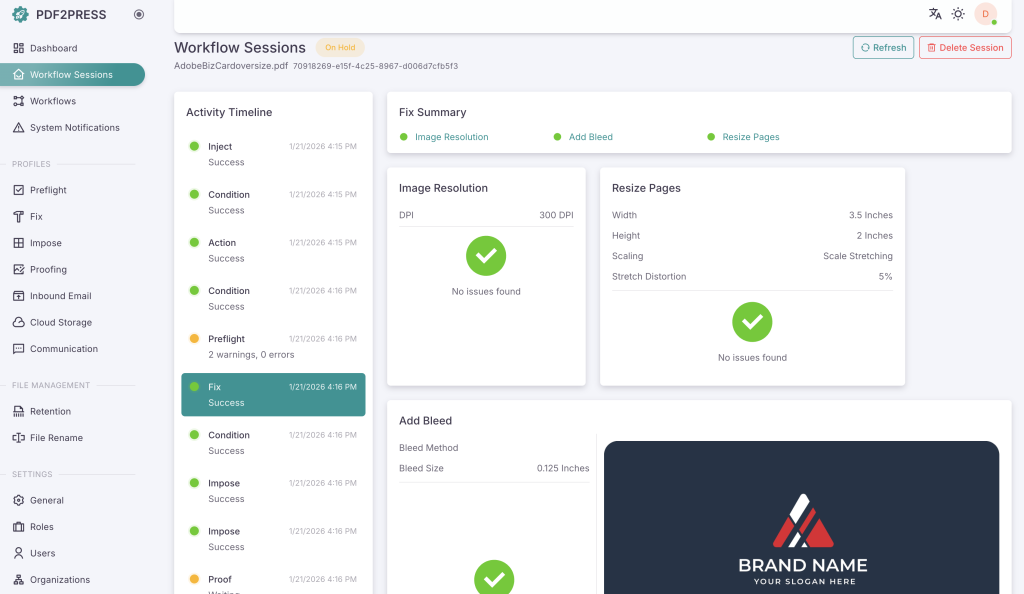
PDF2Press automates the whole prepress chain — intake, configurable preflight, browser-based proofing and imposition — in one cloud platform. Automation isn't all-or-nothing: standard jobs run touchless, complex jobs keep operator override.
What the job path looks like
- Intake. Customer upload, hot folder, email or an API call from your MIS. Processing starts with no operator.
- Preflight. Rules run per customer, job type and output device. Clean files advance; failures are held with a specific, fixable error report.
- Proofing. Reviewers open the soft proof in a browser and approve or reject it. Every action is timestamped and attributed.
- Imposition. Layout is calculated from page count and sheet size, with manual override for complex work.
- Output. A press-ready PDF lands in the destination hot folder, storefront or back in the MIS with status updated.
If you're comparing platforms
| Criterion | What to look for | Why it matters |
|---|---|---|
| Preflight depth | Configurable rules per customer and output device; detailed error reporting | Generic preflight catches obvious errors, not the ones specific to your shop |
| Proofing experience | Browser-based, no client installs, clear approve/reject, version comparison | If reviewers need training or software, adoption drops and you're back to email |
| Imposition | Automated standard schemes plus manual override | Standard jobs should be touchless; complex jobs still want a calculated starting point |
| Integration | API, hot folders, MIS and web-to-print connectivity | A disconnected prepress tool just creates a new silo |
| Scalability | Concurrent job processing; pricing tied to volume, not seats | Growth shouldn't come with a linear cost increase |
Key takeaways
- Prepress touch time, not press time, is the binding constraint in most shops running 10+ jobs a day.
- Configurable preflight catches the errors specific to your customers and output devices — before production.
- Browser-based proofing replaces email chains with a tracked, auditable review cycle.
- Measure the outcome: touch time per job, proofing cycle time, reprint rate, jobs per operator.
Frequently asked
Which shops benefit most?
Commercial printers, book printers, in-plants and agencies with in-house production running 10+ jobs a day on manual prepress. ROI is strongest where prepress touch time is the bottleneck.
Do we need Aleyant's other products?
No. PDF2Press runs standalone. It integrates natively with Pressero if you use Aleyant web-to-print, and connects to third-party systems via API and hot folders.
Is it cloud-only?
Yes. There is no on-premise version — Aleyant manages infrastructure, security, uptime and updates.
What does it cost?
Pricing is based on volume and configuration. Contact Aleyant for a quote against your job mix.